JavaIO原理剖析之 磁盘IO
在日常的工作当中, 我们的IO主要涉及俩方面: 文件IO(磁盘IO) 和网络IO. 本文主要是剖析一下Java中文件IO的实现方式.
下面我们看一个很简单的读文件的程序
1
2
3
4
5
6
7
8
9
10
| import java.io.FileInputStream;
import java.io.IOException;
public class ReadFile {
public static void main(String[] args) throws IOException {
FileInputStream in = new FileInputStream(“xxx.txt");
byte[] cache = new byte[1024];
in.read(cache);
in.close();
}
}
|
上面的程序很简单, 打开一个文件, 然后声明一个byte数组, 将文件的内容读取到byte数组中, 最后将文件关闭. so easy..
下来我们看一下FileInputStream的read源码实现
1
2
3
4
| public int read(byte b[]) throws IOException {
return readBytes(b, 0, b.length);
}
private native int readBytes(byte b[], int off, int len) throws IOException;
|
我们发现最终调用的native方法. 那真正的魔法就是native方法中了, 打开NetBeans(为什么用NetBeans啊, 因为NetBeans可以打开openjdk工程啊), 我们找一下这个方法,,,, 啊找到了, 在这里 openjdk-jdk8u-jdk8u/jdk/src/share/native/java/io/io_util.c
1
2
3
4
5
6
7
8
9
10
11
12
13
14
15
16
17
18
19
20
21
22
23
24
25
26
27
28
29
30
31
32
33
34
35
36
37
38
39
40
41
42
43
44
45
46
47
48
49
50
51
52
53
54
55
|
#define BUF_SIZE 8192
jint
readBytes(JNIEnv *env, jobject this, jbyteArray bytes,
jint off, jint len, jfieldID fid)
{
jint nread;
char stackBuf[BUF_SIZE];
char *buf = NULL;
FD fd;
if (IS_NULL(bytes)) {
JNU_ThrowNullPointerException(env, NULL);
return -1;
}
if (outOfBounds(env, off, len, bytes)) {
JNU_ThrowByName(env, "java/lang/IndexOutOfBoundsException", NULL);
return -1;
}
if (len == 0) {
return 0;
} else if (len > BUF_SIZE) {
buf = malloc(len);
if (buf == NULL) {
JNU_ThrowOutOfMemoryError(env, NULL);
return 0;
}
} else {
buf = stackBuf;
}
fd = GET_FD(this, fid);
if (fd == -1) {
JNU_ThrowIOException(env, "Stream Closed");
nread = -1;
} else {
nread = IO_Read(fd, buf, len);
if (nread > 0) {
(*env)->SetByteArrayRegion(env, bytes, off, nread, (jbyte *)buf);
} else if (nread == -1) {
JNU_ThrowIOExceptionWithLastError(env, "Read error");
} else {
nread = -1;
}
}
if (buf != stackBuf) {
free(buf);
}
return nread;
}
|
整个过程经过了下面四步:
char stackBuf[BUF_SIZE]; 申请8192个字符的内存- 如果申请的内存大小大于
BUF_SIZE, 则重新申请一块内存出来malloc(len). 否则使用stackBuf读取数据.
- 通过系统调用(
IO_Read)将磁盘上的数据读入到buf中.
- 如果读取的数据大于0, 则将
buf拷贝到bytes中.
IO_Read定义在
1
2
3
4
5
6
7
8
9
10
11
12
13
14
15
16
17
18
|
#define IO_Read handleRead
#define RESTARTABLE(_cmd, _result) do { \
do { \
_result = _cmd; \
} while((_result == -1) && (errno == EINTR)); \
} while(0)
ssize_t
handleRead(FD fd, void *buf, jint len)
{
ssize_t result;
RESTARTABLE(read(fd, buf, len), result);
return result;
}
|
整个IO的读过程到这里就结束了, 我们总结一下:
整个读过程总共分配了俩块内存, 一块在jvm中分配的一块在c heap中分配的. 首先通过系统调用read方法, 将磁盘上面的内容拷贝到c heap中那块内存中, 然后再将c heap堆中内存内容拷贝到jvm heap中. 整个过程可以用下面的图表示
常常说地阻塞式io就是这种,就是阻塞在了read这个系统调用上,下面就是阻塞io模型
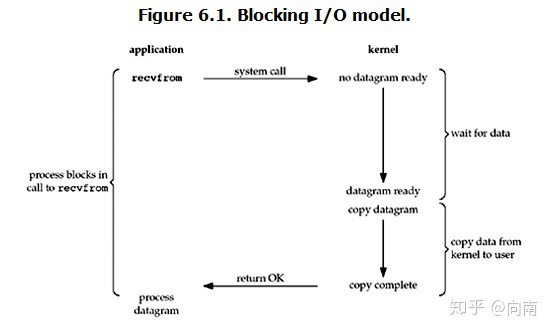
下面这张图点出了read系统调用的整个过程
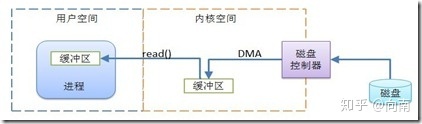
当发起read调用之后,线程阻塞在这里,但是线程却退出了CPU的占用,此时由dma负责将磁盘的数据拷贝到内核读缓冲区中,然后再由CPU将内核读缓冲区的数据拷贝到用户空间内存中。
对了, 最后看一下SetByteArrayRegion, 最后也是通过memcpy, 进行内存拷贝.
1
2
3
4
5
6
7
8
9
10
11
12
13
14
15
16
17
18
19
20
21
22
23
24
|
#ifndef USDT2
#define DEFINE_SETSCALARARRAYREGION(ElementTag,ElementType,Result, Tag) \
DT_VOID_RETURN_MARK_DECL(Set##Result##ArrayRegion);\
\
JNI_ENTRY(void, \
jni_Set##Result##ArrayRegion(JNIEnv *env, ElementType##Array array, jsize start, \
jsize len, const ElementType *buf)) \
JNIWrapper("Set" XSTR(Result) "ArrayRegion"); \
DTRACE_PROBE5(hotspot_jni, Set##Result##ArrayRegion__entry, env, array, start, len, buf);\
DT_VOID_RETURN_MARK(Set##Result##ArrayRegion); \
typeArrayOop dst = typeArrayOop(JNIHandles::resolve_non_null(array)); \
if (start < 0 || len < 0 || ((unsigned int)start + (unsigned int)len > (unsigned int)dst->length())) { \
THROW(vmSymbols::java_lang_ArrayIndexOutOfBoundsException()); \
} else { \
if (len > 0) { \
int sc = TypeArrayKlass::cast(dst->klass())->log2_element_size(); \
memcpy((u_char*) dst->Tag##_at_addr(start), \
(u_char*) buf, \
len << sc); \
} \
} \
JNI_END
|
上面Java 读文件就说完了, 下面说一下Java的读缓存BufferedInputStream.
1
2
3
4
5
6
7
8
9
10
11
12
13
14
15
16
17
18
19
20
21
22
23
24
25
26
27
28
29
30
31
32
33
34
35
36
37
38
39
40
41
42
43
44
45
46
| public synchronized int read() throws IOException {
if (pos >= count) {
fill();
if (pos >= count)
return -1;
}
return getBufIfOpen()[pos++] & 0xff;
}
private void fill() throws IOException {
byte[] buffer = getBufIfOpen();
if (markpos < 0)
pos = 0;
else if (pos >= buffer.length)
if (markpos > 0) {
int sz = pos - markpos;
System.arraycopy(buffer, markpos, buffer, 0, sz);
pos = sz;
markpos = 0;
} else if (buffer.length >= marklimit) {
markpos = -1;
pos = 0;
} else if (buffer.length >= MAX_BUFFER_SIZE) {
throw new OutOfMemoryError("Required array size too large");
} else {
int nsz = (pos <= MAX_BUFFER_SIZE - pos) ?
pos * 2 : MAX_BUFFER_SIZE;
if (nsz > marklimit)
nsz = marklimit;
byte nbuf[] = new byte[nsz];
System.arraycopy(buffer, 0, nbuf, 0, pos);
if (!bufUpdater.compareAndSet(this, buffer, nbuf)) {
throw new IOException("Stream closed");
}
buffer = nbuf;
}
count = pos;
int n = getInIfOpen().read(buffer, pos, buffer.length - pos);
if (n > 0)
count = n + pos;
}
|
我们看到其实 BufferedInputStream 为我们做的只是一个’预读’的操作, 如果我们要读取100个字节的数据, 它会预先帮我读取200个字节, 缓存起来, 下次我们需要下一百个字节的数据的时候, 它就会直接从已经缓冲过的cache中进行读取, 而不用再进行一次IO操作了.